Duotone using CSS blend modes

José M. Pérez / October 26, 2017
1 min read • 12,356 views
In a past post I explained how to use SVG and a feColorMatrix filter to apply a duotone effect to an image. This time I'm going to show how to achieve a similar effect with only CSS.

The code consists of a <div/> that has an image set as a background. Then, we add a ::before and an ::after pseudo-elements with the colours we want to apply and the right blend modes.
Previously, my colleague Thodoris described how to achieve this effect and . I also reproduced it using SVG and a feColorMatrix filter.
This version is based on the technique described by Una Kravets:

Duotone images are so #trendy right now 😎 Had some airport time so I drew out how to get this effect w/one div in CSS 😊 #devdoodles
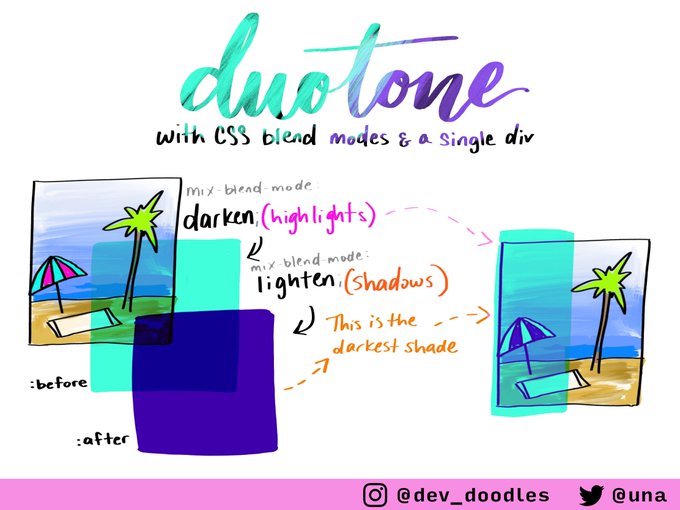
which is also what the library is based on to achieve the duotone effect.